Build scope for this Moonforge guide
This guide has been checked against Q00P: Moonforge Colony version 1.0.1, release ID 20260817162418-cnw9omp67hktn1xa, validated on August 17, 2026. The package archive SHA-256 is 0f1246066f9daf8eb2a25167de926a28f2a97175a9b25b092571e0a3efc7c7ac.
Version 1.0.1 keeps the browser save key q00p_moonforge_colony_v1 and the existing v1 save schema, so the package documentation records compatibility with v1.0.0 progress. It autosaves about every eight seconds and when the page is hidden or closed, while offline production is capped at four hours. The package contains no external JavaScript or CSS dependencies and makes no external network requests during gameplay.
Quick start: get the first production cycle moving
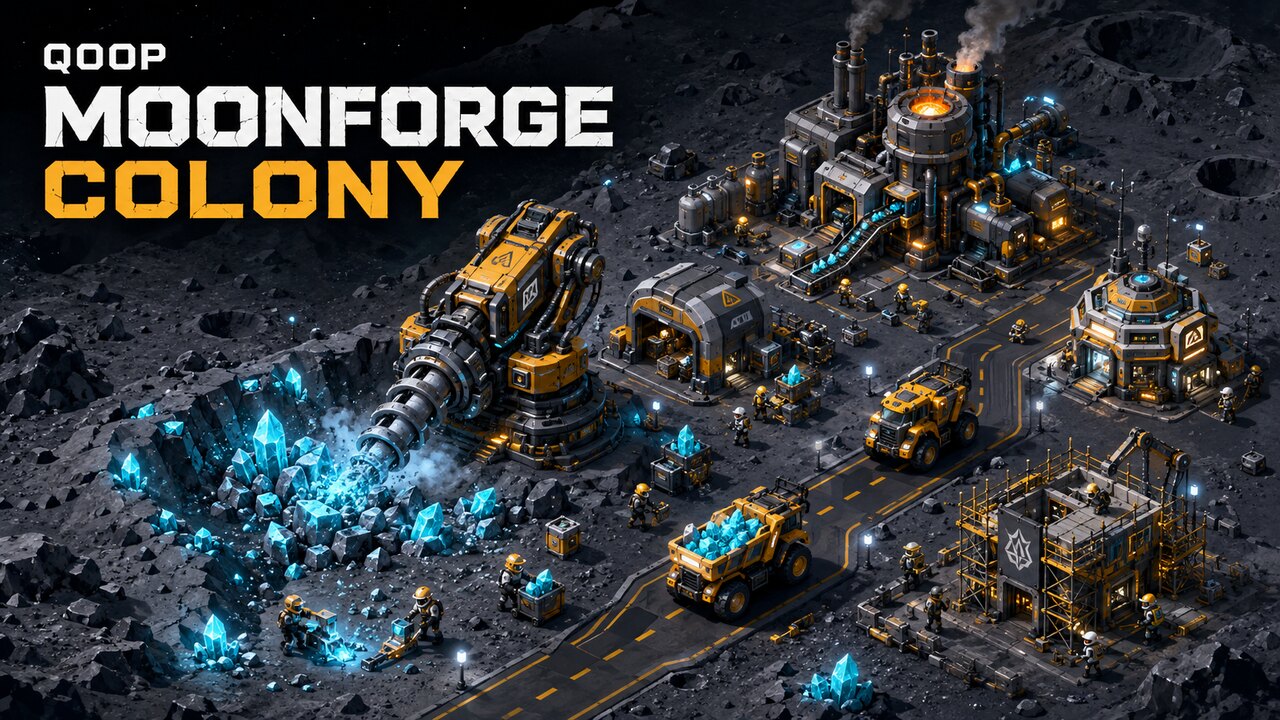
Q00P: Moonforge Colony is an incremental mining tycoon built around a visible production chain. Workers and drills extract ore, haulers collect it, roads carry the vehicles to storage or a refinery, and processed metal funds the colony's next stage. This guide explains how to expand efficiently without spoiling later discoveries.
The opening colony has one Mining Drill, two workers, one hauler, a Worker Hub, a Hauler Depot, and a Warehouse. Start at x1 speed long enough to watch each unit, then switch to x2 or x4. Mine 50 Ore for the first objective. When the Current Task card becomes complete, tap it to claim the Credits and reveal the next mission.
Understand the complete resource loop
The essential loop is Mine Ore → Load Hauler → Follow Road → Unload → Refine → Earn Credits → Upgrade. Raw ore first accumulates at the mining area. A hauler leaves its depot, follows the marked waypoint road, waits for an available loading position, and fills its cargo bed. The vehicle then travels to a valid destination without cutting across terrain.
Before a Refinery exists, delivered ore goes to the Warehouse and generates some Credits. After construction, haulers can feed the Refinery's input buffer. The starting recipe converts 5 Ore into 1 Metal, and each cycle also produces Credits. An empty mine means drilling is the bottleneck; a full mine and busy loading bay indicate a logistics bottleneck.
Use workers as an active production crew
Workers are not passive income counters. They walk to assignments and can mine, carry ore, load resources, unload cargo, build structures, and repair equipment. Recruit two additional workers for the second mission, bringing the early crew to four. The starting Worker Hub supports up to eight workers, so housing will not block the first expansion.
Construction temporarily pulls crew away from mining. Build one important structure at a time so unfinished projects do not divide the workforce. Scaffolding, a progress bar, working animation, and construction particles show that a site is active.
Keep haulers moving without creating traffic
The first Hauler Depot supports two fleet bays, which is enough to buy the second hauler required by the tutorial. Vehicles use defined waypoints and simple queues at the mine and unloading destination. They slow or wait when another vehicle occupies the next position, so temporary stopping is normal and prevents permanent overlap.
Tap a hauler to inspect its state and cargo. “To Mine” means it is travelling empty, “Load Queue” means the bay is occupied, “Loading” fills the visible cargo bed, and “Returning” begins the next cycle. Upgrade the Depot when every fleet bay is occupied. Bigger cargo helps when ore accumulates; faster loading and Smart Routing become stronger once several haulers share the network.
Build the Refinery and advanced colony structures
Complete the first four objectives—mine 50 Ore, reach four workers, own two haulers, and deliver 100 Ore—to unlock the Refinery. Open Build, select Refinery, and tap a glowing industrial pad. A location is rejected when it overlaps another building, occupies a protected road, or uses an incompatible pad. This validation keeps every vehicle route readable.
The Refinery unlocks Metal production. Produce 20 Metal for its mission. A Power Station becomes available after the colony has a Refinery and 10 total Metal; the Research Lab requires that station and 25 total Metal. Reserve Metal for these progression buildings instead of spending it all on optional upgrades.
Choose upgrades and research that solve real bottlenecks
The Mining Drill improves extraction, storage, and loading as it gains levels. The Depot improves fleet capacity, the Hub adds housing, the Warehouse raises storage, and the Refinery increases throughput. Upgrade the structure limiting the visible chain instead of purchasing the cheapest option.
Research has four branches. Mining solves empty-mine delays. Logistics offers Bigger Hauler, Faster Loading, and Smart Routing. Industry eventually improves the recipe from 5 Ore per Metal to 4. Colony strengthens workers, adds housing, and unlocks automation. Every node has prerequisites, so plan a path instead of spreading data randomly.
Complete missions in the intended order
The eight tutorial missions are: mine 50 Ore, hire two workers, buy one hauler, deliver 100 Ore, build a Refinery, produce 20 Metal, upgrade a Drill, and reach 5,000 Credits. Each reward funds part of the following objective. Claim rewards as soon as they are ready, but avoid buying unrelated structures while saving for the Refinery. Reaching the final Credits target is easier when drilling, vehicle capacity, and refining remain balanced.
Autosave, reset, and offline progress
Moonforge Colony saves to localStorage about every eight seconds and when the page is hidden or closed. Resources, units, buildings, research, missions, settings, statistics, and playtime are retained. Continue on the same browser and domain, avoid Incognito mode, and do not clear site data. Save creates an immediate record, while Reset Progress permanently starts over after confirmation.
When you return after at least one minute, the Welcome Back report summarizes time away, Credits earned, and Ore mined. Offline production is capped at four hours, so checking the colony periodically is more productive than leaving it untouched for several days.
Best controls and performance settings for mobile
Moonforge Colony is designed for landscape smartphones. Tap units and buildings to inspect them, drag to pan, pinch to zoom, and use the bottom controls for management. Portrait mode displays a rotation prompt. On lower-end phones, use moderate zoom and x1 or x2 during crowded construction. Music and SFX are controlled separately in Menu.
Final advice
Watch the colony rather than only its counters. Empty cargo beds, full mine storage, refinery input, worker assignments, and vehicle queues reveal exactly where expansion is needed. Keep the road clear, claim every mission reward, reserve Metal for progression, and upgrade the slowest link. A balanced chain grows Moonforge faster than one overpowered building surrounded by idle units.