Home Games Q00P Originals Guides Game Updates Play Styles New Games Popular Editorial Standards
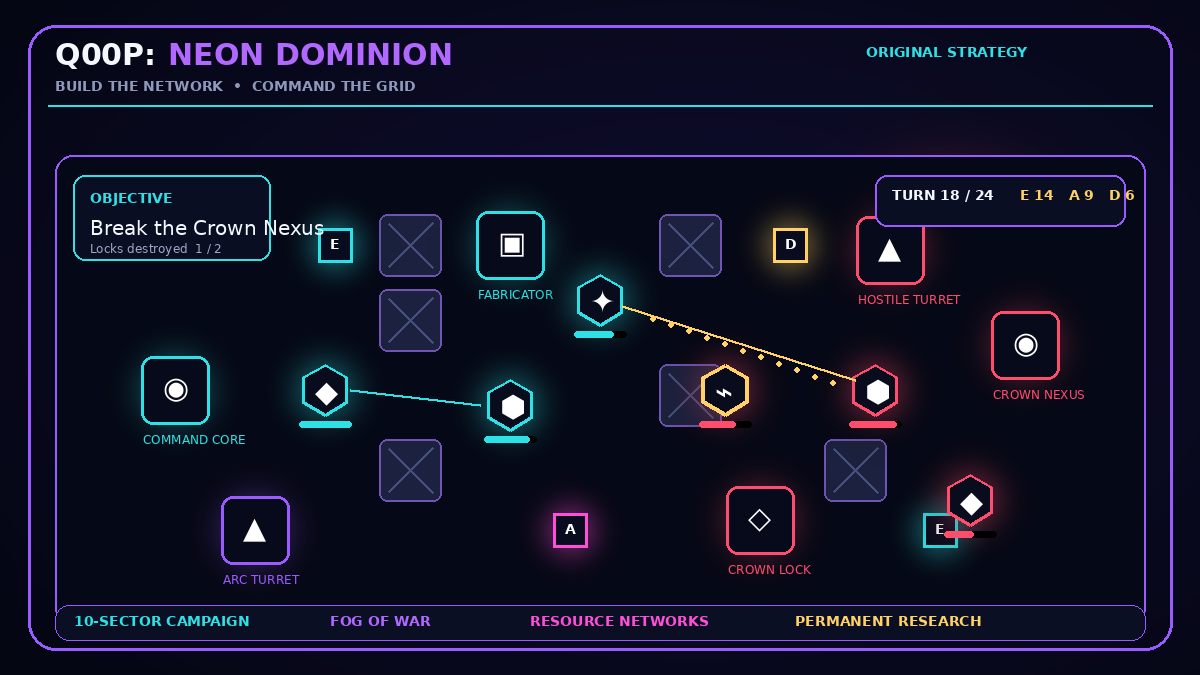
Q00P: Neon Dominion browser game cover
Ready to play

Q00P: Neon Dominion

Build a neon war network, command specialist units, capture resource relays, and defeat the Crown AI across a persistent ten-sector campaign.

Player not started

This reviewed HTML5 package runs inside Q00P’s restricted player. Camera, microphone, location, payments, forms, popups, and top-level navigation are not granted.

ORIGINAL Q00P GUIDE

About Q00P: Neon Dominion

Command the last independent neon network in a deep turn-based strategy campaign. Capture Energy, Alloy, and Data relays; deploy four specialist unit classes; build reactors, foundries, relays, turrets, shields, and forward fabricators; then use tactical protocols to outmaneuver the Crown AI. Ten handcrafted sectors introduce core assaults, survival defenses, relay-control wars, encrypted objectives, fortress sieges, and a final command-nexus battle. Research earned from victories permanently upgrades your economy, units, defenses, and deployment options. Campaign progress and mission records are stored locally, while Endless Skirmish provides an escalating challenge after the main campaign.

⌨

Controls

Mouse or Touch: Tap or click a friendly unit, then select a highlighted destination or hostile target. Drag: Pan across the battlefield. Mouse Wheel: Zoom the battlefield in or out. Number Keys 1–4: Activate the matching visible command card. Enter: End the current player turn. WASD or Arrow Keys: Pan the battlefield on desktop. Escape: Cancel the active command. Press Escape again to pause. Interface Buttons: Open the Field Manual, pause, mute audio, switch command decks, activate units, structures, protocols, and end the turn.
▶

How to play

Protect your Command Core while completing the current mission objective displayed in the upper HUD. Capture a resource relay by moving a friendly unit onto it. Controlled Energy, Alloy, and Data relays generate resources at the beginning of each turn. Spend those resources to deploy units beside a Command Core or War Fabricator, construct buildings beside your existing network, and activate tactical protocols. Each friendly unit normally moves once and attacks once during a turn. Pulse Runners are fast capture specialists, Aegis Sentinels hold the frontline, Prism Lancers attack from range, and Cipher Hackers disable hostile structures. Walls and nearby structures provide cover. Units, controlled relays, and Quantum Relays extend your vision through the fog of war. Use the Units deck to deploy forces, the Structures deck to expand your economy and defenses, and the Protocols deck to repair, scan, overclock, fortify, or launch an EMP attack. End your turn only after completing the commands you need. The Crown AI will then construct forces, move units, capture relays, and attack your network. Campaign victories award Research. Spend Research in the Research Lab to unlock permanent economic, defensive, offensive, and deployment upgrades.

✦

Tips

Capture at least one Energy relay and one Alloy relay early. An economy established one turn sooner produces a major advantage during a long mission. Build War Fabricators near the center of the map so replacement units can enter the battle without walking from the original Command Core. Keep Prism Lancers behind Aegis Sentinels and use walls or structures for cover. Cipher Hackers can disable hostile turrets and shield pylons for two turns, creating a safer breach window. Do not spend all Data immediately. An EMP Cascade or Repair Pulse can reverse a losing battle, while Deep Scan prevents ambushes in sectors with heavy fog. During relay-control missions, place durable Sentinels on important relays and use Pulse Runners to recapture distant positions. A Shield Pylon beside the Command Core grants additional protection and repairs adjacent assets. Combining it with an Arc Turret creates a strong defensive anchor. Research economy upgrades first for a more stable campaign, or prioritize weapons and Rapid Fabrication for an aggressive strategy. Flawless victories grant bonus Research, but protecting the Command Core is more important than saving every individual unit.

Created and published as part of the Q00P original game library.

Browse all Q00P originals ›
✓

Build & publishing record

These values identify the browser build attached to this page. They are read from Q00P's package and commercial-use records for the published release.

#

Build identity

Release ID: 20260801044240-nw1pdmr4xtkkl91s

Package validated: Aug 1, 2026

Files in package: 8

✦

Creator & rights

Creator: Q00P Original Studio

Source record: Q00P Original Studio

License record: Q00P First-Party Commercial Use Record

Rights reviewed: Aug 1, 2026

⌁

Release fingerprint

Build fingerprint: 5acf6ac677457447…

Published: Aug 1, 2026

The full reviewed package and rights evidence remain in Q00P's private publishing records; this page exposes only the public release identifiers needed to distinguish the current build.

◷

Q00P: Neon Dominion updates

All updates ›
Content update

Neon Dominion Development Notes: Building a Readable Strategy Campaign

How Neon Dominion combines mission objectives, resource relays, specialist units, structures and permanent research into a readable browser strategy campaign.

Human runtime check

Compatibility & known limitations

This published build was human-verified on Google Chrome 152.0.7977.82 running on Android 10 on September 5, 2026. The verification confirms that the current Q00P player reached a rendered game session in that environment. It is not a claim that every browser, operating system, device, or control path has been tested.

Verified environment

  • Browser: Google Chrome 152.0.7977.82
  • Platform: Android 10
  • Verification date: September 5, 2026
  • Scope: current published Q00P build and isolated-player runtime

Known limitations

  • Landscape provides the full command interface. Portrait phones receive a rotate-device prompt.
  • The current build uses HTML5 Canvas, Web Audio, pointer/touch input, and browser local storage.
  • Campaign and research progress are browser-local and are not automatically synchronized to another browser or profile.